A virtual data room is a secure online repository designed to store, edit, and share confidential information. At their core, virtual data rooms are the descendants of physical spaces where various documents related to a business or intended for a specific deal were stored.
Unlike their predecessors, virtual data rooms offer their users flexibility and accessibility, enabling them to work with documents around the clock, regardless of their location. Only the data room admin can define and set restrictions.
Virtual data rooms also allow users to upload, view, edit, and comment on the files. Furthermore, the most popular providers offer additional options: an F.A.Q. section, work chat, integration with a calendar, and project management tools.
A data room typically follows a hierarchical structure, organized into categories, folders, and subfolders. This structured approach facilitates navigation and retrieval of documents, ensuring that users can easily find the information they need. Additionally, many data rooms offer advanced search functionality, enabling users to search for specific documents across the entire platform quickly.
Top virtual data room providers
The table below will help you structure all features properly. All data was collected from providers’ websites and interviews with direct providers’ customers and structured by in-house virtual data room experts.
#1 · Top choice
Ideals
Established 2008 · 1M+ businesses worldwide
★★★★★4.8 / 5Avg. rating based on 1,000+ reviews on G2 & Capterra
Editor’s pick 2026
Ideals virtual data room is widely recognized as the leading VDR solution — a customer-oriented data room that stands out for:
Exceptional customer support with a 30-second chat-response time and an average 5-min case resolution
Easy-to-use interfaces, average 15-minute set-up, and sync with the desktop app
Top-notch security features like fence view, user access expiration, and eight granular access controls
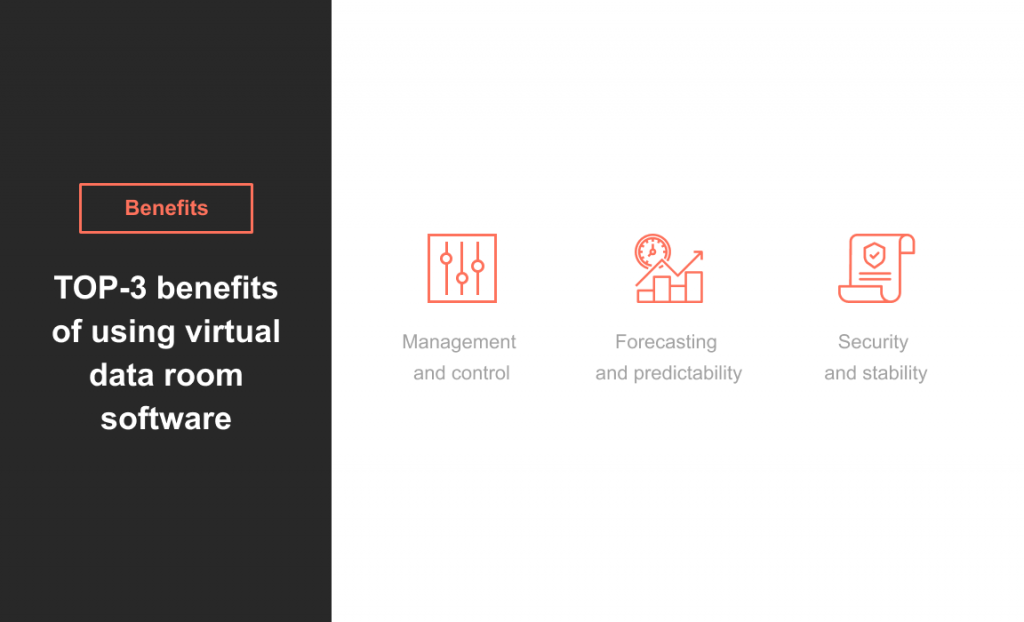
Virtual data rooms have many advantages over physical or traditional data rooms and other online platforms. The most important benefits are:
Management and control. Virtual data rooms allow for precise and adaptable management of users’ access to specific documents or designated sections of data rooms. Furthermore, sophisticated remote functions empower business administrators to remove sensitive data, irrespective of its download to users’ devices.
Security and stability. Two-factor authentication, a log of actions with documents and user activities within the data room, and other security options and protocols ensure a secure data exchange and collaboration within the virtual data room.
Enhanced communication. Virtual data rooms facilitate communication among stakeholders through features such as discussion threads and Q&A sections. These communication tools improve collaboration, clarify information, and speed up decision-making processes.
Forecasting and predictability. Virtual data rooms enable businesses to forecast expenses for months and years and reduce maintenance costs by eliminating the need to employ full-time programmers or administrators and maintain their infrastructure.
Online data rooms vs. physical data rooms
A physical data room and a virtual data room are built for the same purpose: controlled access to sensitive deal documents—think M&A, fundraising, disputes, audits, or IP-heavy projects. The difference is the working setup. A physical room means people show up in person, review materials on-site, and work around schedules and availability.
A VDR moves that process online. Reviewers can access files remotely, while you keep tighter control over what each person can see and do. You also get practical tools that paper rooms can’t match at scale—search, permission settings by user/group, and audit logs that show who opened which file and when.
Data room functionality
Explore the key functionality that makes virtual data rooms essential for secure and efficient document management.
Essential features of virtual data rooms
Feature category
What’s included
Enterprise-level security
□ A limited viewing mode □ Remote shred following the downloading of the data □ Dynamic watermarks □ Built-in redaction
Access settings
□ Single or bulk invitations for users (separately or in groups) □ Detailed user permissions □ Customizable user notifications
Document management
□ Drag-n-drop □ Bulk upload of files of any format □ Automated index numbering □ Full-text search □ File merging
Ease of use
□ Single sign-on □ Multilingual access □ A mobile user interface □ Native apps (iOS, Android) □ Multi-project management
Analytics
□ Full audit trails □ Data room activity dashboard □ User-behavior tracking □ Reports
Collaboration
□ Frequently asked question segments □ Real-time discussion □ Auto-assignment of questions to experts □ Question status □ Notifications □ Comments and annotations
Customization
□ Customizable logo, theme colors, and company branding □ Customizable headers and footers □ Customizable watermarks
How to choose a data room provider: main tips
To choose the most relevant provider for your business, we recommend you to do the following:
Determine your needs. Assess whether the data room provider has experience in your industry or specializes in deals relevant to your business. Ensure that the provider’s platform is tailored to meet your specific requirements.
Evaluate data security. Review the provider’s Service Level Agreement (SLA) to understand their commitment to data security and uptime. Look for clear and concise terms regarding data encryption, access controls, and system reliability to ensure the safety of your sensitive information.
Assess data room features. Use the above-mentioned list of features to evaluate the provider. Alternatively, you can check the comparison table of providers on our website.
Consider data room cost. Evaluate the cost structure of using the data room, considering both upfront fees and ongoing expenses. Calculate the potential return on investment (ROI) of implementing an online data room by analyzing its benefits in terms of time savings, efficiency, and risk mitigation.
Research user reviews. Read reviews from businesses in your industry or similar sectors to gain insights into their experiences with different data room providers. Pay attention to reviews that highlight specific strengths or weaknesses of the provider’s platform, support services, and overall user experience.
Assess support services. Evaluate the quality of the provider’s customer support by contacting their support team. Look for indicators of responsive and knowledgeable support, such as quick response times, helpful guidance, and proactive problem-solving.
The difference between VDR and cloud storage
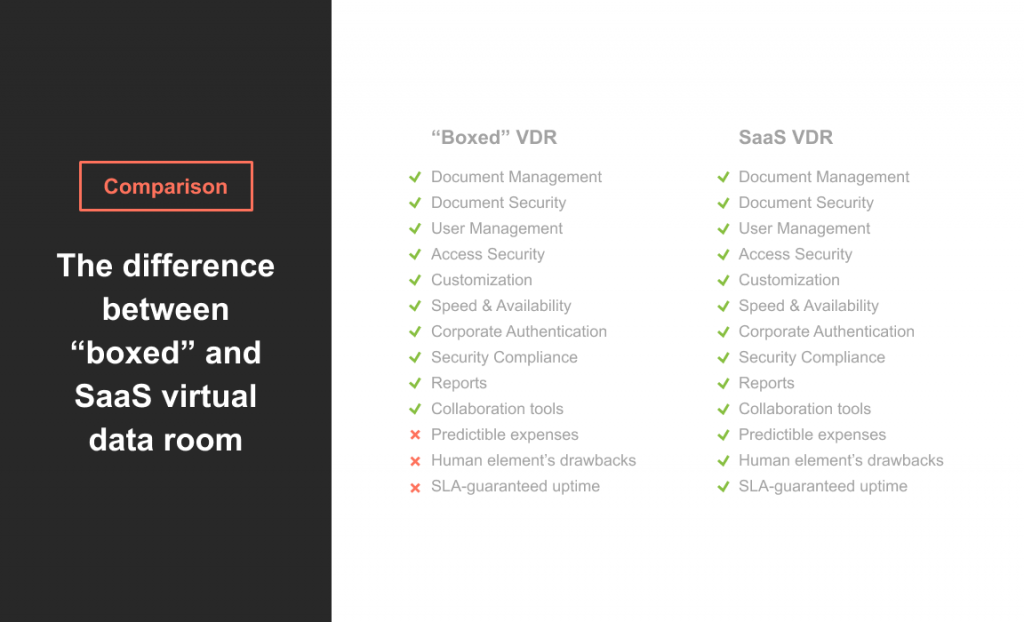
Among the important decisions you have to make when selecting online data room software is the choice between a boxed and cloud-based solution.
In general, the selection of features behind both approaches is similar: they store documents securely while providing flexible access control and collaboration tools, etc. However, there are differences as well.
First difference: maintenance cost
With a software (server) solution, you will need to pay for the server, hire a support team and programmers to maintain it. With a cloud (software-as-a-service or SaaS) solution, there won’t be such a need.
Second difference: the drawbacks of the human factor
A software solution works the same way as a SaaS solution in terms of user access, control of users’ rights to view, edit, copy, or download documents in an electronic data room; it provides the same collaboration tools as SaaS.
Yet, the boxed solution has one significant drawback: the influence of the human factor. Most hacker attacks that occur in the corporate environment today are performed not by using programmers’ skills, but employing social engineering.
Therefore, if someone gains physical access to your server (s) storing sensitive data, these people will have full access to downloading any information, bypassing even the most advanced digital security protocols.
Virtual data room use cases
VDRs are mostly used by companies that need to work with a significant number of documents, control the level of access to each document, and ensure uninterrupted and secure collaboration.
That is why the main areas of the VDR use are:
Mergers and acquisitions (M&A) and due diligence process. For incorporation documents; corporate bylaws; stock option agreements and plans; recapitalization or restructuring documents; income, sales, and other tax returns filed in the last five years; tax sharing and transfer pricing agreements; patents; copyrights; trademarks; licenses and licensing agreements.
Fundraising. For CVs of each founder and any key members; business description; pitch deck; information deck; business model deck; financial model (P&L, business plan, funding, exit strategy); marketing plan; warranties; due diligence documents; etc.
Initial public offering (IPO). For listing application forms; approved prospectus; audited annual reports and financial statements; certificate of incorporation; memorandum and articles of association; and due diligence documents.
Real estate deals. For income details documents; mortgage discharge authority form; certificate of title; closing disclosure; additional documents for refinancing, first home buyers, investors, construction loan, and homeowners.
Life science documents. For case report forms (CRFs); informed consent forms; patient diaries, recruitment materials, reported outcome measures, source documents; pharmacological studies and protocols; medical devices documents; and regulatory affairs.
Legal processes. For documents related to legal cases, court filings, evidence, expert reports, and settlement agreements; contracts, agreements, and legal documents requiring review, negotiation, and approval.
Financial transactions. For documents related to the sale or purchase of assets such as equipment, real estate, or intellectual property; loan agreements, debt schedules, financial statements; shareholder agreements, subscription agreements, and investment term sheets.
Intellectual property management. For patent applications, patents granted, licensing agreements, and patent litigation; registration certificates, trademark agreements, copyright assignments, and infringement notices.
Strategic partnerships and joint ventures. For documents outlining the terms and conditions of strategic partnerships, joint ventures, or collaborations; contracts and agreements related to licensing intellectual property, distribution rights, or technology.
FAQ
What is a virtual data room?
A virtual data room (VDR) is an online repository used to store and share sensitive documents securely during business transactions. It allows authorized users to access, view, and manage documents remotely, eliminating the need for physical data storage.
Where are virtual data rooms used?
Data rooms are used during various business transactions and processes, including mergers and acquisitions, due diligence, fundraising, legal proceedings, regulatory compliance, and strategic partnerships.
Are virtual data rooms secure?
Yes, data room vendors prioritize security and employ advanced encryption methods and security measures to ensure data is protected from unauthorized access and data breaches. Additionally, VDRs often undergo regular security audits and compliance certifications to ensure adherence to industry standards and regulations.
What are the disadvantages of virtual data rooms?
While implementing a virtual data room offers numerous benefits, it may also have some drawbacks. This includes potential complexities in setup, dependence on the internet for access, ongoing subscription costs, and the need for user training. Additionally, some users may find it challenging to navigate the platform’s functionality.
What is the difference between file sharing and data room?
File sharing typically refers to the sharing of individual files between users or groups, often through cloud storage platforms like Google Drive or Dropbox. In contrast, virtual data rooms offer a more comprehensive and secure solution for managing business data, including features for communication and collaboration.
Is Dropbox a data room?
No. While Dropbox provides basic file-sharing functionality, it lacks the advanced security features, access controls, audit trails, and collaboration functionality, typically found in virtual data room solutions. Therefore, Dropbox may not be suitable for handling sensitive documents in business transactions.